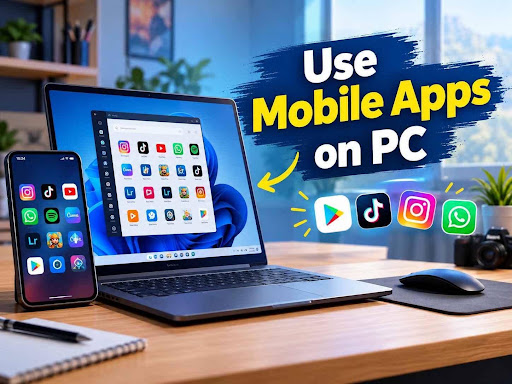
Influencers, content creators, designers and digital professionals are seeking effective ways to improve their workflow. Smartphones give strong tools for making content anywhere, many creators favor using mobile apps on PC as desktop computers give larger screens, speedy performance and better multitasking capabilities.
Creators can also combine the flexibility of mobile applications with the power of desktop hardware by running Android apps on Windows PCs. Tools for editing videos, designing graphics, managing social media and organizing projects become easier to use when gained through a computer environment.
Why Creators Use Mobile Apps on PC
1. Better Editing Experience
Video creators and photographers frequently use mobile editing apps as they give simple interfaces and strong features. When these apps run on a PC, creators get more control through a larger display, keyboard and mouse.
Popular uses include:
- Video editing
- Thumbnail designing
- Photo enhancement
- Short video creation
- Animation work
Apps like Canva, Lightroom, CapCut and other creative tools get easier to manage when creators work on a desktop setup.
2. Faster Content Creation Workflow
Creators need to handle several tasks at the same time including writing scripts, researching topics, editing videos and uploading content.
Using mobile apps on a PC enables creators to:
- Copy and paste content easily
- Manage files rapidly
- Switch between applications
- Work with several windows
It saves time as compared to continuously switching between a smartphone and computer.
3. Improved Social Media Management
Social media creators frequently manage several accounts across platforms such as Instagram, YouTube, Facebook and TikTok.
Mobile versions of social media apps at times provide features that are not available in desktop browsers. Running these apps on PC enables creators to:
- Upload content easily
- Reply to comments faster
- Manage messages
- Schedule posts
- Monitor audience engagement
Tools like Android emulators and phone integration solutions enable creators to obtain these mobile features directly from Windows.
4. Better Gaming Content Creation
Gaming creators frequently use Android apps on PC to record stream videos, mobile gameplay and make gaming content.
Benefits include:
- Larger gaming screen
- Keyboard and mouse controls
- Better recording quality
- Improved streaming setup
Android emulators like BlueStack helps users to run Android applications and games on Windows computers.
Popular Mobile Apps Creators Use on PC
Canva
Canva is extensively used for making:
- YouTube thumbnails
- Social media posts
- Logos
- Presentation designs
Using Canva on a PC provides more workspace and easy design control.
CapCut
CapCut is well-known among video creators due to its:
- AI editing tools
- Effects
- Templates
- Subtitle features
On a bigger screen, creators can edit short videos and social media content effectively.
Lightroom Mobile
Photography creators use Lightroom for:
- Color correction
- Image enhancement
- Professional editing
A PC setup enables better viewing of small details.
Notion and Productivity Apps
Many creators use productivity apps for:
- Content planning
- Script writing
- Project management
- Idea organization
Apps such as Notion, Google Keep and task managers assist creators maintain organized workflows.
Methods to Run Mobile Apps on PC
1. Android Emulators
Android emulators make a virtual Android environment on Windows. They help users to install Google Play Store for PC and run Android apps on PC.
Popular options include:
- BlueStacks
- LDPlayer
- NoxPlayer
- Android Studio Emulator
This method is helpful for creators who need complete Android functionality.
2. Phone Link
Microsoft Phone Link helps users to connect Android phones with Windows computers. Compatible devices can display mobile apps, messages, notifications and files directly on the PC.
This helps creators stay focused without continuously checking their phones.
3. Samsung DeX
Samsung DeXgives a desktop style experience for supported Samsung devices. It helps users to use Android apps in a more computer-like environment with bigger screens and accessories.
Tips for Better Creator Productivity
To get the best experience from mobile apps on PC:
- Use a powerful processor and enough RAM
- Keep apps updated
- Organize files properly
- Use cloud storage for backups
- Avoid installing apps from unsafe sources
- Use keyboard shortcuts whenever possible
FAQs About Using Mobile Apps on PC
1. Can creators run Android apps on Windows?
Yes, creators can run Android apps on Windows using emulators, Phone Link, or other Android integration solutions.
2. Which Android apps are useful for content creators?
Popular creator apps include Canva, CapCut, Lightroom, Notion, Google Drive, and social media applications.
3. Is using Android apps on a PC better than using a phone?
For many creative tasks, a PC provides advantages such as a bigger screen, better controls, faster performance, and improved multitasking.
4. Are Android emulators safe for creators?
Yes, trusted emulators are generally safe. Users should download them from official sources and avoid unknown software.
5. Can I edit YouTube videos using mobile apps on PC?
Yes. Many creators use mobile editing apps on PC for creating YouTube videos, Shorts, Instagram Reels, and other content.